


by Alex Feldstein (noreply@blogger.com) at December 26, 2015 12:02 PM
A few days ago I was working on one of my old applications and needed to add support for a resizable panel based layout in HTML. Specifically this is for HTML Help Builder which is an application that generates HTML based documentation from class libraries, databases and that also lets you create help topics manually for full documentation purposes. The generated output for documentation typically has a two panel layout and I needed to integrate resizing functionality from the old school frames interface that had been in use before.
Surprisingly there aren't a lot of resizing libraries out there and the ones that are available tend to be rather large as they are either part of larger libraries or are trying to manage the UI specifically for a scenario such as panel layout components. I couldn't find anything that was lean and can just rely on basic CSS layout to handle the UI part of resizing. So as is often the case, I ended up creating my own small jquery-resizable plug-in as this isn't the first time I've looked into this.
jquery-resizable is a small jquery plug-in that handles nothing but the actual resizing of a DOM element. It has no direct UI characteristics other than physically resizing the element. It supports mouse and touch events for resizing and otherwise relies on CSS and HTML to handle the visual aspects of the resizing operations. Despite being minimalistic, I find it really easy to hook up resize operations for things like resizable windows/panels or for things like split panels which is the use case I set out to solve.
If you're impatient and just want to get to it, you can jump straight to the code on GitHub or check out some of the basic examples:
jQuery-resizable is a small jQuery plug-in that – as the name implies – resizes DOM elements when you drag them in or out. The component handles only the actual resizing operation process and doesn't deal with any UI functionality such as managing containers or sizing grips – this is all left up to HTML and CSS, which as it turns out is pretty easy and very flexible. The plug-in itself simply manages the drag operation events for both mouse and touch operation and resizing the specified container(s) that is being resized. The end result is a pretty small component that's easily reusable.
You can use this component to make any DOM element resizable by using a jQuery selector to specify the resizable element as well as specifying a drag handle element. A drag handle is the element that has to be selected initially to start dragging which in a splitter panel would be the splitter bar, or in a resizable dialog would be the sizing handle on the lower left of a window.
The syntax for the component is very simple:
$(".box").resizable({
    handleSelector: "size-grip",
    resizeHeight: false,
    resizeWidth: true
});
Note that you can and should select a handle selector which is a separate DOM element that is used to start the resize operation. Typically this is a sizing grip or splitter bar. If you don't provide a handleSelector the base element resizes on any drag operation, which generally is not desirable, but may work in some situations.
The options object also has a few event hooks – onDragStart, onDrag, onDragEnd - that let you intercept the actual drag events that occur such as when the element is resized. For full information on the parameters available you can check the documentation or the GitHub page.
Here's a simple example on CodePen that demonstrates how to make a simple box or window resizable:
![ResizeBox[8]](http://weblog.west-wind.com/images/2015Windows-Live-Writer/A-small-jQuery-Resizable-Plug-in_DB94/ResizeBox%5B8%5D.png "ResizeBox[8]")
In order to resize the window you grab the size-grip and resize the window as you would expect.
The code to enable this functionality involves adding the jQuery and jquery-resizable scripts to the page and attaching the resizable plug-in to the DOM element to resize:
<script src="//ajax.googleapis.com/ajax/libs/jquery/1.11.3/jquery.min.js" type="text/javascript"></script>
<script src="scripts/jquery-resizable.js"></script>
<script>
    $(".box").resizable({ handleSelector: ".win-size-grip" });
</script>
The key usage requirement is to select the DOM element(s), using a jQuery selector to specify the element(s) to resize. You can provide a number of options with the most important one being the .handleSelector which specifies the element that acts as the resizing initiator – when clicked the resizing operation starts and the as you move the mouse the base element is resized to that width/height.
As mentioned, jquery-resizable doesn't do any visual formatting or fix-up, but rather just handles the actual sizing operations. All the visual behavior is managed via plain HTML and CSS which allows for maximum flexibility and simplicity.
The HTML page above is based on this HTML markup:
<div class="box">
    <div class="boxheader">Header</div>
    <div class="boxbody">
        Resize me
    </div>
    <div class="win-size-grip"></div>
</div>
All of the UI based aspects – displaying the sizing handles (if any) and managing the min and max sizes etc. can be easily handled via CSS:
.box {
    margin: 80px;
    position: relative;
    width: 500px;
    height: 400px;
    min-height: 100px;
    min-width: 200px;
    max-width: 999px;
    max-height: 800px;
}
.boxheader {
    background: #535353;
    color: white;
    padding: 5px;
}
.boxbody {
    font-size: 24pt;
    padding: 20px;
}
.win-size-grip {
    position: absolute;
    width: 16px;
    height: 16px;
    bottom: 0;
    right: 0;
cursor: nwse-resize;
    background: url(images/wingrip.png) no-repeat;
}
So to make the UI work – in this case the sizing grip in the bottom right corner – pure CSS is used. The Box is set using position:relative and the grip is rendered to the bottom left corner with position:absolute which allows the grip to be attached to the lower right corner using a background image. You can also control sizing limitations using max/min/width/height in CSS. to constrain the sizing to appropriate limits.
You can check out and play around with this simple example in CodePen or in the sample grabbed from GitHub.

I mentioned that I was looking for a light-weight way to implement a two panel display that allows for resizing. There are a number of components available that provide this sort of container management. These are overkill for what I needed and it turns out that it's really easy to create a resizable two panel layout using jquery-resizable.
You can take a look at the Resizable Splitter Panels sample on CodePen to see how this works in a simple example.
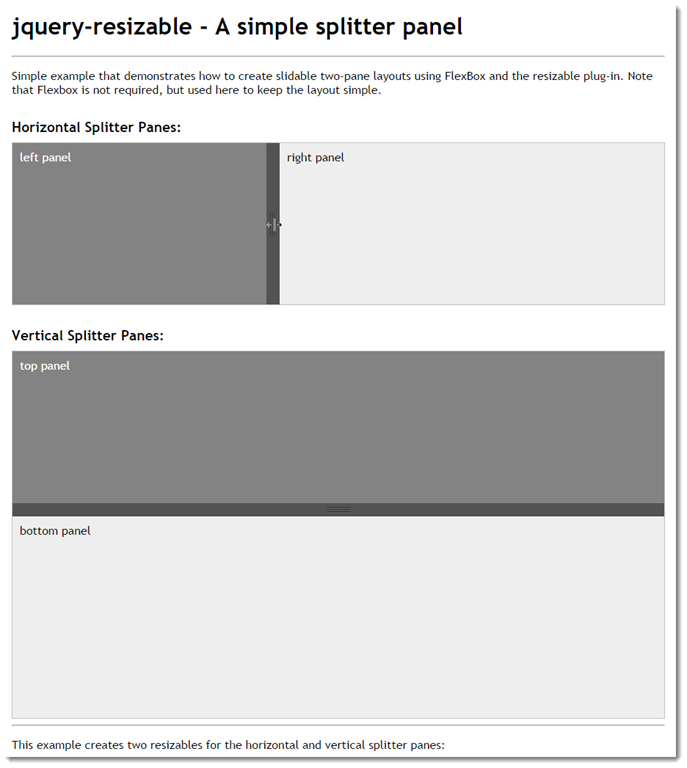
Let's take a look and see how this works. Let's start with the top panel that horizontally splits the two panels. This example uses FlexBox to create two panes that span the whole width of the screen, with the left side being a fixed width element, while the right side is a variable width auto-stretching container.
Here's the HTML:
<div class="panel-container">

    <div class="panel-left">
        left panel
    </div>

    <div class="splitter">
    </div>

    <div class="panel-right">
        right panel
    </div>
</div>
Pretty simple – the three panels are contained in top level container that in this case provides the FlexBox container. Here's the CSS:
/* horizontal panel*/
.panel-container {
    display: flex;
    flex-direction: row;
    border: 1px solid silver;
    overflow: hidden;
}
.panel-left {
    flex: 0 0 auto;  /* only manually resize */
    padding: 10px;
    width: 300px;
    min-height: 200px;
    min-width: 150px;
    white-space: nowrap;

    background: #838383;
    color: white;
}
.splitter {
    flex: 0 0 auto;
    width: 18px;
    background: url(images/vsizegrip.png) center center no-repeat #535353;
    min-height: 200px;
    cursor: col-resize;
}
.panel-right {
    flex: 1 1 auto; /* resizable */
    padding: 10px;
    width: 100%;
    min-height: 200px;
    min-width: 200px;
    background: #eee;
}
FlexBox makes this sort of horizontal layout really simple by providing relatively clean syntax to specify how the full width of the container should be filled. The top level container is marked as display:flex and flex-direction: row which sets up the horizontal flow. The panels then specify whether they are fixed in width with flex: 0 0 auto or stretching/shrinking using flex: 1 1 auto. What this means is that right panel is auto-flowing while the right panel and the splitter are fixed in size – they can only be changed by physically changing the width of the element.
And this is where jquery-resizable comes in: We specify that we want the left panel to be resizable and use the splitter in the middle as the sizing handle. To do this with jquery-resizable we can use this simple code:
$(".panel-left").resizable({
   handleSelector: ".splitter",
   resizeHeight: false
});
And that's really all there's to it. You now have a resizable two panel layout. As the left panel is resized and the width is updated by the plug-in, the panel on the right automatically stretches to fill the remaining space which provides the appearance of the splitter resizing the list.
The vertical splitter works exactly the same except that the flex-direction is column. The layout for the verticals:
<div class="panel-container-vertical">

    <div class="panel-top">
        top panel
    </div>

    <div class="splitter-horizontal">
    </div>

    <div class="panel-bottom">
        bottom panel
    </div>
</div>
The HTML is identical to the horizontal except for the names. That's part of the beauty of flexbox layout which makes it easy to change the flow direction of content.
/* vertical panel */
.panel-container-vertical {
    display: flex;
    flex-direction: column;
    height: 500px;
    border: 1px solid silver;
    overflow: hidden;
}
.panel-top {
    flex: 0 0 auto;  /* only manually resize */
    padding: 10px;
    height: 150px;
    width: 100%;
    background: #838383;
    color: white;
}
.splitter-horizontal {
    flex: 0 0 auto;
    height: 18px;
    background: url(images/hsizegrip.png) center center no-repeat #535353;
    cursor: row-resize;
}
.panel-bottom {
    flex: 1 1 auto; /* resizable */
    padding: 10px;
    min-height: 200px;
    background: #eee;
}
and finally the JavaScript:
$(".panel-top").resizable({
    handleSelector: ".splitter-horizontal",
    resizeWidth: false
});
It's pretty nice to see how little code is required to make this sort of layout. You can of course mix displays like this together to do both vertical and horizontal resizing which gets a little more complicated, but the logic remains the same – you just have to configure your containers properly.
The thing I like about this approach is that that JavaScript code is minimal and most of the logic actually resides in the HTML/CSS layout.
This is pretty close to the implementation I ended up with using for my Html Help Builder implementation of the final help layout, which ended up looking like this:
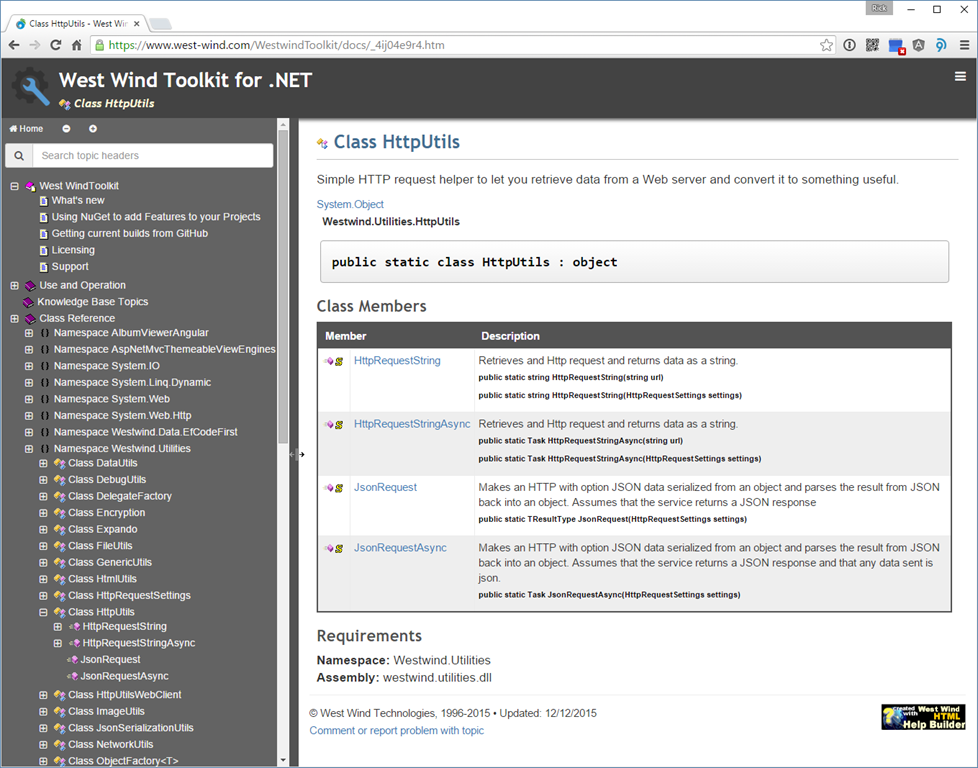
Sweet!
The code for the jquery-resizable is pretty straight forward. The code essentially waits for mouseDown or touchStart events on the sizing handle which indicates the start of the resizing operation. When the resize starts additional mouse and touch events are hooked up for mouseMove and touchMove and mouseUp and touchEnd events. When the move events fire the code captures the current mouse position and resizes the selected element's width or height to that location. Note that the sizing handle itself is not explcitly moved – it should move on its own as part of the layout, so that when the container resizes the handle is moved with it automatically adjusting to the location.
For reference here's the relatively short code for the plug-in (or you can also check out the latest code on GitHub):
/// <reference path="jquery.js" />
/*
jquery-watcher
Version 0.13 - 12/22/2015
© 2015 Rick Strahl, West Wind Technologies
www.west-wind.com
Licensed under MIT License
*/
(function($, undefined) {
    if ($.fn.resizable)
        return;

    $.fn.resizable = function fnResizable(options) {
        var opt = {
            // selector for handle that starts dragging
            handleSelector: null,
            // resize the width
            resizeWidth: true,
            // resize the height
            resizeHeight: true,
            // hook into start drag operation (event passed)
            onDragStart: null,
            // hook into stop drag operation (event passed)
            onDragEnd: null,
            // hook into each drag operation (event passed)
            onDrag: null,
            // disable touch-action on $handle
            // prevents browser level actions like forward back gestures
            touchActionNone: true
        };
        if (typeof options == "object") opt = $.extend(opt, options);

        return this.each(function () {
            var startPos, startTransition;

            var $el = $(this);
            var $handle = opt.handleSelector ? $(opt.handleSelector) : $el;

            if (opt.touchActionNone)
                $handle.css("touch-action", "none");

            $el.addClass("resizable");
            $handle.bind('mousedown.rsz touchstart.rsz', startDragging);

            function noop(e) {
                e.stopPropagation();
                e.preventDefault();
            };

            function startDragging(e) {
                startPos = getMousePos(e);
                startPos.width = parseInt($el.width(), 10);
                startPos.height = parseInt($el.height(), 10);

                startTransition = $el.css("transition");
                $el.css("transition", "none");

                if (opt.onDragStart) {
                    if (opt.onDragStart(e, $el, opt) === false)
                        return;
                }
                opt.dragFunc = doDrag;

                $(document).bind('mousemove.rsz', opt.dragFunc);
                $(document).bind('mouseup.rsz', stopDragging);
                if (window.Touch || navigator.maxTouchPoints) {
                    $(document).bind('touchmove.rsz', opt.dragFunc);
                    $(document).bind('touchend.rsz', stopDragging);
                }
                $(document).bind('selectstart.rsz', noop); // disable selection
            }

            function doDrag(e) {
                var pos = getMousePos(e);

                if (opt.resizeWidth) {
                    var newWidth = startPos.width + pos.x - startPos.x;
                    $el.width(newWidth);
                }

                if (opt.resizeHeight) {
                    var newHeight = startPos.height + pos.y - startPos.y;
                    $el.height(newHeight);
                }

                if (opt.onDrag)
                    opt.onDrag(e, $el, opt);

                //console.log('dragging', e, pos, newWidth, newHeight);
            }

            function stopDragging(e) {
                e.stopPropagation();
                e.preventDefault();

                $(document).unbind('mousemove.rsz', opt.dragFunc);
                $(document).unbind('mouseup.rsz', stopDragging);

                if (window.Touch || navigator.maxTouchPoints) {
                    $(document).unbind('touchmove.rsz', opt.dragFunc);
                    $(document).unbind('touchend.rsz', stopDragging);
                }
                $(document).unbind('selectstart.rsz', noop);

                // reset changed values
                $el.css("transition", startTransition);

                if (opt.onDragEnd)
                    opt.onDragEnd(e, $el, opt);

                return false;
            }

            function getMousePos(e) {
                var pos = { x: 0, y: 0, width: 0, height: 0 };
                if (typeof e.clientX === "number") {
                    pos.x = e.clientX;
                    pos.y = e.clientY;
                } else if (e.originalEvent.touches) {
                    pos.x = e.originalEvent.touches[0].clientX;
                    pos.y = e.originalEvent.touches[0].clientY;
                } else
                    return null;

                return pos;
            }
        });
    };
})(jQuery,undefined);
There are a few small interesting things to point out in this code.
The first is a small thing I ran into which was that I needed to turn off transitions for resizing. I had my left panel setup with a width transition so when the collapse/expand button triggers the panel opens with a nice eas-in animation. When resizing this becomes a problem, so the code explicitly disables animations on the resized component.
If you run into other things that might interfere with resizing you can hook into the three drag event hooks – onDragStart, onDrag, onDragEnd – that are fired as you resize the container. For example the following code explicitly sets the drag cursor on the container that doesn't use an explicit drag handle when the resize is started and stopped:
$(".box").resizable({
    onDragStart: function (e, $el, opt) {
        $el.css("cursor", "nwse-resize");
    },
    onDragStop: function (e, $el, opt) {
        $el.css("cursor", "");
    }
});
You can return false from onDragStart to indicate you don't want to start dragging.
The resizing implementation was surprisingly simple to implement, but getting the touch support to work took a bit of sleuthing. The tricky part is that touch events and mouse events overlap so it's important to separate where each is coming from. In the plug-in the important part is getting the mouse/finger position reliably which requires looking both at the default jQuery normalized mouse properties as well as at the underlying touch events on the base DOM event:
function getMousePos(e) {
    var pos = { x: 0, y: 0, width: 0, height: 0 };
    if (typeof e.clientX === "number") {
        pos.x = e.clientX;
        pos.y = e.clientY;
    } else if (e.originalEvent.touches) {
        pos.x = e.originalEvent.touches[0].clientX;
        pos.y = e.originalEvent.touches[0].clientY;
    } else
        return null;

    return pos;
}
It sure would be nice if jQuery could normalize this automatically so properties things like clientX/Y and pageX/Y on jQuery's wrapper event could return the right values or either touch or mouse properties, but for now we still have to normalize manually.
On the same note the code has to explicitly check for touch support and if available bind the various touch events like touchStart, touchMove and touchEnd which adds a bit of noise to the otherwise simple code. For example, here's the code that decides whether the touchmove and touchend events need to be hooked:
if (window.Touch || navigator.maxTouchPoints) {
    $(document).bind('touchmove.rsz', opt.dragFunc);
    $(document).bind('touchend.rsz', stopDragging);
}
There are a couple of spots like this in the code that make the code less than clean, but… the end result is nice and you can use either mouse or touch to resize the elements.
It wouldn't be any fun if there wasn't some freaking problem with IE or Edge, right?
Turns out IE and Edge on Windows weren't working with my original code. I didn't have a decent touch setup on Windows until I finally managed to get my external touch monitor to work in a 3 monitor setup. At least now I can test under this setup. Yay!
Anyway. There are two issues with IE – it doesn't have window.Touch object, and so checking for touch was simply failing to hook up the other touch events that the plug-in is listening for. Instead you have to look for an IE specific navigator.maxTouchPoints property. That was problem #1.
Problem #2 is that IE and Edge have browser level gestures that override element level touch events. Other browsers like Chrome ave those too but they are a bit more lenient in their interference with the document. By default I couldn't get the touchStart event to fire because the browser level events override the behavior.
The workaround for this is the touch-action: none property that basically disables the browser from monitoring for document swipes for previous. This CSS tag can be applied to the document, or any container or as I was happy to see the actual drag handle. Ideally applying it to the drag handle doesn't have any other side effects on the document and prohibit scrolling so the code now optionally forces touch-action: none onto the drag handle via a flagged operation:
if (opt.touchActionNone)
    $handle.css("touch-action", "none");
You can try it out here with Edge, IE, Chrome on a touch screen. I don't have a Windows Phone to try with – curious whether that would work.
http://codepen.io/rstrahl/pen/eJZQej
As always if you plan on supporting touch make very sure that you make your drag handles big enough to support my fat fingers. It's no fun to try and grab a 3 point wide drag handle 10 times before you actually get it…
All of this isn't rocket science obviously, but I thought I'd post it since I didn't find an immediate solution to a simple way to implement resizing and this fits the bill nicely. It's only been a week since I created this little plug-in and I've retrofitted a number of applications with sliders and resizable window options where it makes sense which is a big win for me. Hopefully some of you might find this useful as well.


by Alex Feldstein (noreply@blogger.com) at December 19, 2015 06:00 AM

by Jun Tangunan (noreply@blogger.com) at December 17, 2015 11:06 PM

 We're happy to announce beta 4 of West Wind Html Help Builder. Help Builder is a tool to create documentation for all kinds of scenarios including application or developer documentation, FAQs, snippet repositories, knowledge bases, Help Desk references. Using Help Builder's low friction interface to create content you can generate HTML Web site output, CHM files or export to Word or PDF. It uses all Web based technologies for styling, templating and customization, and lets you focus on creating your content not worrying about markup. Using 5.0's new editor and support for the Markdown text format content writing becomes distraction free. 5.0 also introduces new mobile friendly templates that make content more accessible, fast to navigate and SEO friendly. For developers, Help Builder allows creating class and database documentation from source files including .NET types, SQL Server database, FoxPro code, Web Services definitions and data and COM objects. Mix and match imported documentation with your custom documentation content. Documentation doesn't have to be a chore - let Help Builder help!
Using some functional principals and using immutable data can really make your JavaScript a lot better and easier to test. While using immutable data in JavaScript seems like something really complex it turns out is really isn’t that hard to get started with if you are already using Babel. And while libraries like Immutable.js are highly recommended we can start even simpler.
Babel does a lot of things for you as it lets you use all sorts of next generation JavaScript, or ECMAScript 2015 to be more correct. And it is quite easy to use whatever your build pipeline is or even as a standalone transpiler if you are not using a build pipeline yet.
When you want to use immutable data the functional array functions map() and filter() as well as spread properties are really useful. Here are a few examples to get you started.
Changing a property on an object
var originalPerson = {
  firstName: 'Maurice',
  lastName: ''
};

var newPerson = {
  ...originalPerson,
  lastName: 'de Beijer'
};

console.log(newPerson);
The …originalPerson is using the spread properties which expands all properties. The lastName: ‘de Beijer’ comes after it so it overrules the lastName from the originalPerson object. And the result is a new object.
{
  firstName: "Maurice",
  lastName: "de Beijer"
}
Simple and easy. And as we are never changing objects we can replace the var keyword with the new const keyword to indicate variables are never reassigned.
const originalPerson = {
  firstName: 'Maurice',
  lastName: ''
};

const newPerson = {
  ...originalPerson,
  lastName: 'de Beijer'
};

console.log(newPerson);
Adding something to an array
Usually when adding something to an array either an assignment or a push() function is used. But both just mutate the existing array instead of creating a new one. And with the pure functional approach we do not want to modify the existing array but create a new one instead. Again really simple using spread properties.
const originalPeople = [{
  firstName: 'Maurice'
}];

const newPeople = [
  ...originalPeople,
  {firstName: 'Jack'}
];

console.log(newPeople);
In this case we end up with a new array with two objects:
[{
  firstName: "Maurice"
}, {
  firstName: "Jack"
}]
Removing something from an array
Deleting from an array is just as simple using the array filter() function.
const originalPeople = [{
  firstName: 'Maurice'
},  {
  firstName: 'Jack'
}];

const newPeople = originalPeople.filter(p => p.firstName !== 'Jack');

console.log(newPeople);
And we end up with an array with just a single person.
[{
  firstName: 'Maurice'
}]
Updating an existing item in an array
Changing an existing items is just as easy when we combine spread properties with the array map() function.
const originalPeople = [{
  firstName: 'Maurice'
},  {
  firstName: 'Jack'
}];

const newPeople = originalPeople.map(p => {
  if (p.firstName !== 'Jack') {
    return p;
  }

  return {
    ...p,
    firstName: 'Bill'
  };
});

console.log(newPeople);
And that is all it takes to change Jack to Bill.
[{
  firstName: "Maurice"
}, {
  firstName: "Bill"
}]
Really nice and easy and it makes for very easy to read code once you are familiar with the new spread properties.


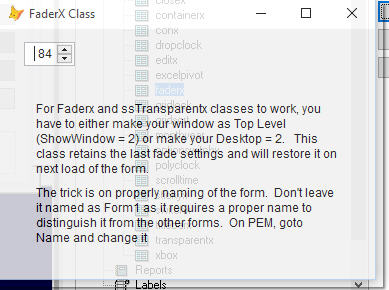


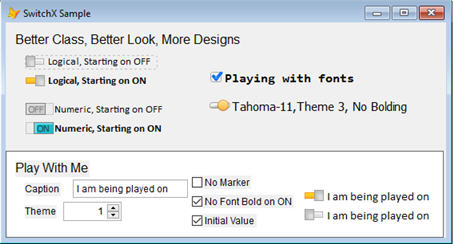


by Jun Tangunan (noreply@blogger.com) at December 14, 2015 07:07 AM


by Alex Feldstein (noreply@blogger.com) at December 14, 2015 06:00 AM


by Alex Feldstein (noreply@blogger.com) at December 13, 2015 06:00 AM


by Alex Feldstein (noreply@blogger.com) at December 13, 2015 12:57 AM
Help us plan for Southwest Fox and Southwest Xbase++ 2016. Comment on recommended topics and add your own on our conference blog.
Make a difference by participating in the conversation!
by Doug Hennig (noreply@blogger.com) at December 07, 2015 05:19 PM
 Help us plan for Southwest Fox and Southwest Xbase++ 2016. Comment on recommended topics and add your own on our conference blog. http://swfox.net/blog/2015/12/what-do-you-want-to-learn-in-2016/
Help us plan for Southwest Fox and Southwest Xbase++ 2016. Comment on recommended topics and add your own on our conference blog.
Make a difference by participating in the conversation!


by Alex Feldstein (noreply@blogger.com) at December 03, 2015 06:00 AM
by Philadelphia Visual FoxPro User Group at December 01, 2015 09:18 PM
 Check out our blog at vfpphilly.blogspot.com.
We're on Twitter: @VFUGPhilly
Check out our blog at vfpphilly.blogspot.com.
We're on Twitter: @VFUGPhilly
by Tamar E. Granor (noreply@blogger.com) at December 01, 2015 09:11 PM
 West Wind Technologies has released beta 3 for version 6.0 of their flagship Web development tool West Wind Web Connection. Web Connection is a Web development framework for Visual FoxPro that allows you to use your FoxPro skills to build Web applications, services and APIs. Version 6.0 is a major update that provides many improvements to the development process. A new project system facilitates setting up, moving and deploying of projects. Automated configuration scripts make deployment much easier. Layout Pages, Partials and Sections allow for more modular MVC style HTML applications. There's new support for extensionless URLs, easier Authentication support, a Markdown parser and many new HtmlHelpers. Beta 3 is a stable release and can be installed side by side with existing Web Connection installations.
I was looking into creating prefilled emails using Outlook Automation earlier today and ran into an unexpected snag. The requirement was to display a pre-filled email that contains recipient, subject, body and one or more attachments and then display the prefilled email in Outlook.
This is fairly straightforward to do using COM Automation:
TRY
    *** NOTE: This fails if you run as Administrator (rather than the active user)
    loOutlook = GETOBJECT(,"Outlook.Application")
CATCH
ENDTRY

IF VARTYPE(loOutlook) != "O"
   loOutlook = CREATEOBJECT("Outlook.Application")
ENDIF

IF VARTYPE(loOutlook) != "O"
   MESSAGEBOX("Couldn't create Outlook instance")
   RETURN
ENDIF

loItem = loOutlook.CreateItem(0)
loItem.Body = "Hello World"
loItem.Subject = "New Test Message"
loItem.Recipients.Add("rstrahl@west-wind.com")

*** Add you files to attach here
loItem.Attachments.Add("c:\sailbig.jpg")

loItem.Display()

RETURN
Note that Outlook – as most Office Applications – is a Singleton object that expects to run only one instance. So if Outlook is already running you can use CREATEOBJECT() to create a new instance. Instead, you have to attach to an already running instance using GETOBJECT().
I typically run FoxPro as an Administrator because I frequently build COM objects, which requires that you run as a full administrator in order to write COM registration to the registry.
However, when running the above code, it turns out the GETOBJECT() call to capture Outlook.Application fails. It works fine when you run as a non-admin user or even as an Admin user when User Account Control (UAC) is enabled on the machine and your account is effectively running as a non Admin account.
But when you explicitly run as an Administrator either using Run As Administrator when you start the app, or from ShortCut properties, or if you have UAC disabled on the machine, you'll find that the GETOBJECT() call fails with:
OLE error code 0x800401e3: Operation unavailable.
The reason for this is that when you run as Administrator you are actually running a different user account (Administrator – duh) and that account can't actually access the running instance of Outlook that is already running on your desktop. The only workaround I could find is to ensure both Outlook and your application run in the same execution context. So it works if you run your app without administrative rights, or if you run your app as administrator as well as Outlook.
As you might expect it took me a long time to figure out WTF was going on here. According to all examples I've seen Outlook should be accessible with GETOBJECT(). It wasn't until I tried using wwDotnetBridge and COM Interop doing the same thing with .NET and getting the same response in FoxPro but not in LinqPad when I realized it must have something to do with the actual runtime environment. Sure enough – once I started VFP without Run as Administrator option, the code works.


by Alex Feldstein (noreply@blogger.com) at November 29, 2015 12:47 PM
Lately I’ve been working on a new project with my friend Ian Jacob. Together we co-host a new HubSpot focussed podcast called HubShots.
There’s 6 episodes available so far (and two more recorded and currently being edited).
If you’re interested in inbound marketing, content marketing and HubSpot, then I think you’ll really like the podcast. We’re aiming for 30 minutes or less for each episode, and include a bunch of action items in each as well – so there’s something useful you can try right away.
Have a listen here. We’re also on iTunes, Stitcher and Soundcloud.
Would love to know what you think.
The post HubShots – Aussie HubSpot Podcast appeared first on Craig Bailey.
 West Wind Technologies has released an updated beta of West Wind Html Help Builder 5.0. Help Builder is a documentation solution that makes it easy to create any kind of documentation for applications, FAQs, references and more. You can generate CHM Help files, MS Word and PDF files as well as HTML based online documentation you can easily publish to the Web. Version 5.0 is a major update that introduces a brand new text editor and a much richer editing experience as well as-you-type spell checking. Help Builder also adds the popular Markdown format for quicker text input and the ability to share text more easily. There are also new, cleaner and simpler templates for output creation and an overall overhaul of the user interface. Help Builder is available as shareware, and registered users can upgrade to the new version.
For software developers lots of screen real estate is important – it seems like there's never enough. Trying to see code, and multiple browser windows, debuggers and command windows all at once or at least in a way that you can find all these windows quickly is difficult if you don't have a ton of screen real estate lest you get into multi-finger acrobatics. Yeah, we've all done that. For the longest time I've fallen behind in my expansion of screen real estate – I've been stuck with a couple of 27" 1080p monitors (plus the laptop screen) for a looong time. I missed the WQHD/WQXGA era because it seemed like too little too late, when 4k was on the horizon. However it seems like it's taken a long time for 4k monitors to actually catch on and even longer for some decent sized 4k displays to become available.
A couple of weeks ago when I got back to Maui and my office (after 6 months on the mainland), I finally decided to jump in and buy a 4k monitor. But not just any monitor either but a freaking behemoth of a monitor that is the 40" Phillips BDM4065UC.
4k seems to me the logical next step for monitor resolutions, but a 4k monitor on anything smaller than a 30+ inch monitor is pointless, so I've been waiting for for larger models to show up. I discovered the Philips monitor before it was released in the US and was available only as an import and it looked tempting then. The thing that put me off initially was that it's relatively cheap compared to most other 4k monitors – it's in the same price ranger as mid to high end ~30" monitors which seems surprising given that this is one of the very few large 4k monitors out there. So, naturally I was skeptical and with lack of reviews at the time I decided to hold off.
In the last 6 months I've checked the reviews again and talked to a few people that bought these and said they were good – not great but good. Since I've never owned a super high end monitor I figured I can live with purist limitations and decided to get it.
After a week and half with this beast I can tell you one thing: There's no way I'm going back to a smaller monitor!
This monitor is very large compared to the 27" displays I've been using in my office. Just to give you and idea, here is the monitor with one of the old 27" monitors on the right and the 15" MacBook Pro on the left. Look how puny the 27" looks compared to the Philips.
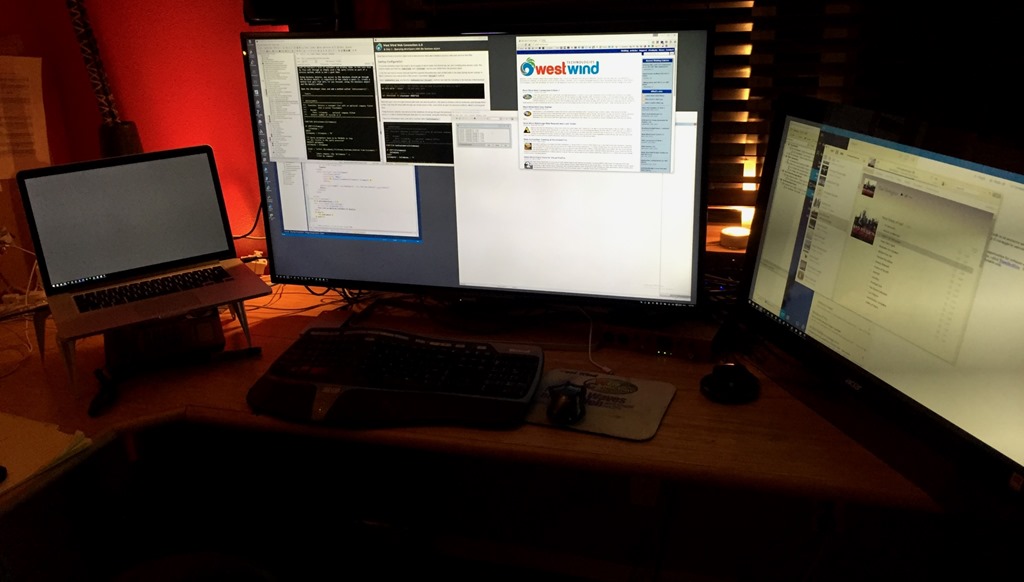
Yes it's a behemoth. When the box showed up at the door it was a definite OMG moment! Sylvia said it must be some mistake on the delivery and now she's worried I might never emerge from my office again :-). Once set up the monitor barely fit underneath the mounted speakers…
When I sat down in front of the monitor for the first time I definitely thought: This is going to be too freaking large. I felt like being at a tennis match in the front row. You definitely have to turn your head to see each end of the monitors edges :-)
But surprisingly after a day or so of use the monitor no longer feels massive, but rather it feels – just right. It takes a little getting used to, in terms of figuring out how to place your windows for maximum efficiency to access them and to put the content you're working at the right eye level. The screen real estate is amazing. 4k is essentially four 1080p monitors and that is a lot of space. Making the most of all this space takes some experimenting – I like to layer my windows so that part of every window is always visible so it's easy to get to each open window and with 4k of space it's very easy to keep a lot of stuff open and accessible.
40" is big enough so you can run the monitor in its native 100% resolution without any scaling required from Windows or the Mac. I run Windows at 100% and the Mac in smallest scaled size it can do and while it's a little bit on the small side it's totally doable. I'd say it's probably equivalent of what you would get with a 24" display at 1080p.
To give you an idea of screen size consider this screen shot of using Visual Studio with 3 edit windows open simultaneously plus a document and test view, plus a full screen browser with the Dev Tools open:

Everything you need on one screen!
The real kicker here is the vertical resolution – if you want to see a lot of lines of code in a single page, this is a pure joy to get over 2k vertical pixel height When you're heads down working this setup is pretty sweet with Code, HTML, CSS all open in a single view, plus a code search, active browser and browser dev tools. It's pretty damn productive when everything is right there without flipping between different windows or monitors.
Another really cool use for all that screen real estate for me has been running my music recording rig. I use LogicProX on the Mac and running a DAW at 4k is simply amazing.
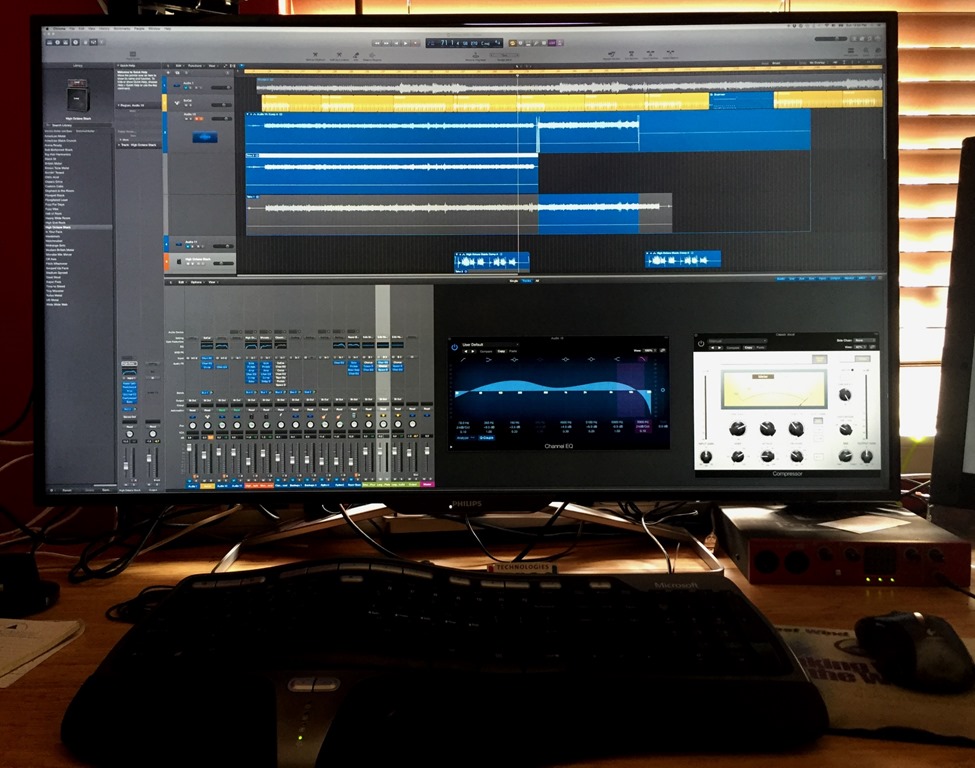
I can see all my tracks, plus the full track mixer plus a number of bus views and plug ins I'm actively working on in a single view. When I'm actually recording I can see the whole track while it's running which provides some useful visual feedback.
In short having this much screen real estate is just awesome. But what's really scary is that now going back to the 1080p display to do anything feels like a an 800x600 display of old. It's going to be hard going back to smaller resolutions once you get used to this much screen real estate.
Given that this is a relative cheap monitor for this size, the monitor is pretty nice. Yes it's missing some amenities, but the things that really matter for developers are all there and working.
There's lots to like:
Note that in order to get the monitor to run at 60hz, which is a requirement if you want to run it at native resolution so you don't get severe mouse lag, you have to configure the monitor explicitly via the on screen menus. Those menus are a bit tricky to work at first – it's a funky joy stick at the back. The DisplayPort configuration is in the Setup section of the onscreen menu on the bottom.
It's a mystery why they would ship this thing with DisplayPort 1.1 support enabled by default when you can't really get good enough screen performance to run it at native resolution. You definitely need DisplayPort 1.2 to use this monitor effectively so make sure you have a video card that supports this.
I'm using the current 15" MacBook Pro with the monitor and it works great. You'll need a mini DP to full DP cable which is not included in the box to hook up a laptop. There are a host of cables that come with the monitor including a full size DisplayPort cable, but no mini to full DP cable.
You will also need a video card that actually supports 4k video output. Most recent video cards on higher end laptops and most reasonably recent dedicated GPUs should support 4k and DisplayPort 1.2 but be sure to check first.
Driving this much screen requires a lot of horsepower and I have noticed that the GPU is working pretty hard and forcing the MacBook fan to run a lot more than it did before. I also noticed that while running in Parallels, the mouse is not quite as smooth as it used to be. However, in native Windows (Bootcamp) or native Mac there's no problem. You do want to bump the mouse pointer sensitivity nearly as high as it will go so you can get around all of this screen real estate. Any small hiccup in the mouse software or wireless connectivity is noticeable – I'm considering getting a wired mouse to avoid these disconnects.
As I mentioned early, when I did some research on this monitor the reviews were good but not exactly glowing. The bottom line is that this is a good monitor, but it's not a competitor in the top of the line camp for monitors. This is not an IPS monitor so while the screen is super sharp, the color gamut is average at best. Even playing around with the color settings on the monitor and in the OS gives decent but slightly washed out colors. I settled on the standard SRGB settings which are not customizable at the monitor level with some gamma tweaking in the video settings for the video card to make colors pop a little better. This isn't to say the colors are bad, but compared to high end displays this monitor is not a contender.
The other issue are viewing angles. Because the monitor is absolutely massive this actually matter a lot more than other monitors because you are actually affected by viewing angles sitting directly in front of the monitor. I've had issues with things on the very bottom of the screen – like Windows Taskbar highlights being difficult to see because they are so small. If you are really close to the monitor and looking down the bottom edge starts disappearing. The higher you sit the more noticeable this problem becomes. It's a minor thing that could be easily fixed if the monitor had veritcal adjustment so the image could be moved up a touch, but in certain color profiles you can't adjust the image position.
Because the monitor is so big, I also noticed that there are a few uneven spots in the display. This is not a problem if you sit right in front of it but from various angles you see these uneven spots as slightly shaded/discolored.
The monitor comes on a fixed stand – there's no adjustment for height or angle. On the plus side the stand is an open metal frame that leaves room underneath the monitor so you can store stuff underneath the monitor.
None of these are deal breakers, and given the price of the monitor this is what you would expect.
To me this is the right size for a monitor because it's the size that is borderline too big, but can display an enormous amount of pixels at native resolution. I think this is as big of a monitor that you can comfortably use sitting right in front of, so I don't foresee much bigger monitors coming along in the future and getting much traction. Some would say that this is too big, but I think this is pretty close to the sweet spot for 4k displays. It's big, but it doesn't feel too big. I also think that even higher resolutions aren't going to matter all that much for monitors because this monitor's resolution is already ultra sharp – anything higher and we're just going to start scaling the screen down which seems pointless. So personally I think 4k seems like a sweet spot with 30"+ size monitors.
I'm rather surprised that there are a so few bigger size monitors out there. To date there are only very few and most of the other ones are a lot more expensive. I think this will change eventually once more people use these behemoths and they become more common. If you're a developer, once you see one of these, or better yet you've had a chance to work on one for a few hours you'll probably realize very quickly how productive it is to have all this screen real estate.
The Philips is a decent monitor and great deal for the price. It's bare bones but it gets the most important job done effectively.
There's no going back for me.


by Alex Feldstein (noreply@blogger.com) at November 21, 2015 06:00 AM


by Alex Feldstein (noreply@blogger.com) at November 20, 2015 06:00 AM
I've been building a number of solutions lately that relied heavily on parsing text. One thing that seems to come up repeatedly is the need to split strings but making sure that certain string tokens are excluded. For example, a recent MarkDown parser I've built for Help Builder needs to make sure it first excludes all code snippets, then performs standard parsing then puts the code snippets back for custom parsing.
Another scenario is when Help Builder imports .NET classes and it has to deal with generic parameters. Typically parameters are parsed via commas to separate them, but .NET generics may add commas as part of generic parameter lists.
Both of those scenarios require that code be parsed by first pulling out a token from a string and replacing it with a placeholder, then performing some other operation and then putting the the original value back.
For me this has become common enough that I decided I could really use a couple helpers for this. Here are two functions that help with this:
************************************************************************
*  TokenizeString
****************************************
***  Function: Tokenizes a string based on an extraction string and
***            returns the tokens as a collection.
***    Assume: Pass the source string by reference to update it
***            with token delimiters.
***            Extraction is done with case insensitivity
***      Pass:  @lcSource   -  Source string - pass by reference
***             lcStart     -  Extract start string
***             lcEnd       -  Extract End String
***             lcDelimiter -  Delimiter embedded into string
***                            #@# (default) produces:
***                            #@#<sequence Number>#@#
***    Return: Collection of tokens
************************************************************************
FUNCTION TokenizeString(lcSource,lcStart,lcEnd,lcDelimiter)
LOCAL loTokens, lcExtract

IF EMPTY(lcDelimiter)
   lcDelimiter = "#@#"
ENDIF

loTokens = CREATEOBJECT("Collection")

lnX = 1
DO WHILE .T.
    lcExtract = STREXTRACT(lcSource,"<",">",1,1+4)
    IF EMPTY(lcExtract)
       EXIT
    ENDIF
    loTokens.Add(lcExtract)

    lcSource = STRTRAN(lcSource,lcExtract,lcDelimiter + TRANSFORM(lnx) + lcDelimiter)
    lnx = lnx + 1
ENDDO

RETURN loTokens
ENDFUNC
*   TokenizeString

************************************************************************
*  DetokenizeString
****************************************
***  Function: Detokenizes an individual value of the string
***    Assume:
***      Pass:  lcString    - Value that contains a token
***             loTokens    - Collection of tokens
***             lcDelimiter - Delimiter for token id
***    Return: detokenized string or original value if no token
************************************************************************
FUNCTION DetokenizeString(lcString,loTokens,lcDelimiter)
LOCAL lnId, loTokens as Collection

IF EMPTY(lcDelimiter)
  lcDelimiter = "#@#"
ENDIF

DO WHILE .T.
    lnId = VAL(STREXTRACT(lcString,lcDelimiter,lcDelimiter))
    IF lnId < 1
       EXIT
    ENDIF
    lcString = STRTRAN(lcString,lcDelimiter + TRANSFORM(lnId) + lcDelimiter,loTokens.Item(lnId))
ENDDO

RETURN lcString
ENDFUNC
*   DetokenizeString
TokenizeString() basically picks out anything between one or more start and end delimiter and returns a collection of these values (tokens). If you pass the source string in by reference the source is modified to embed token place holders into the the passed string replacing the extracted values.
You can then use DetokenizeString() to detokenize either individual string values or the entire tokenized string.
This allows you to basically work on the string without the tokenized values contained in it which can be useful if the tokenized text requires separate processing or interferes with the string processing of the original string.
Here's an example of the comma delimited list of parameters I mentioned above. Assum I have a list of comma delimited parameters that needs to be parsed:
DO wwutils
CLEAR

lcParameters = "IEnumerable<Field,bool> List, Field field, List<Field,int> fieldList"
? "Original: "
? lcParameters
?
*** Creates tokens in the lcSource String and returns a collection of the
*** tokens.
loTokens = TokenizeString(@lcParameters,"<",">")

? lcParameters
* IEnumerable#@#1#@# List, Field field, List#@#2#@# fieldList

FOR lnX = 1 TO loTokens.Count
   ? loTokens[lnX]
ENDFOR
?
? "Tokenized string: " + lcParameters
?
? "Parsed parameters:"
*** Now parse the parameters
lnCount = ALINES(laParms,lcParameters,",")
FOR lnX = 1 TO lnCount
   *** Detokenize indvidual parameters
   laParms[lnX] = DetokenizeString(laParms[lnX],loTokens)
   ? laParms[lnX]
ENDFOR

?
? "Detokenized String (should be same as original):"
*** or you can detokenize the entire string at once
? DetokenizeString(lcParameters,loTokens)
IEnumerable<Field,bool> List, Field field, List<Field,int> fieldList
Notice that this list contains generic parameters embedded in the < > brackets so I can't just run ALINES() on this list. The following code strips out the generic parameters first, then parses the list then adds the token back in.
This isn't the sort of thing you run into all the time, but for me it's been surprisingly frequent that I've had to do stuff like this and while this isn't terribly difficult to do manually, it's very verbose code that is shrunk to a couple of simple helper functions. Maybe some of you will find this useful though…
This is a temporary post that was not deleted. Please delete this manually. (985bcb61-0ec6-4544-8328-f6f5c07e6154 - 3bfe001a-32de-4114-a6b4-4005b770f6d7)


by Alex Feldstein (noreply@blogger.com) at November 19, 2015 06:00 AM

 Alex Feldstein
Andrew Coates ::: MSFT
Articles
Beginning Visual FoxPro Tips
Beth Massi - Sharing the goodness
CULLY Technologies, LLC
Calvin Hsia's WebLog
Cathy (Pountney) Knight
Cetin Basoz's Blog
Chris Sainty
Christof Wollenhaupt
Craig Bailey
David T. Anderson
Del Lee's Blog
Doug Hennig
Experiencing Life on the Verge
F1 Technologies Blog
FoxCentral News
Foxite.COM Community Weblog
Frank Perez
GonzoMaximus - The Lion in Winter
Guineu
Ken Levy's Blog
Kevin Ragsdale's FoxPro Blog
LessthanDot » Naomi Nosonovsky
Martin Salias Eng
PEM Editor for FoxPro
Paul Mrozowski's Blog
ProSysPlus Blog
Randy Jean's Blog
Rick Strahl's FoxPro and Web Connection Web Log
Rick Strahl's Web Log
Ruminating on Tech
SPS Blog
Sandstorm's Blog (Home of ssClasses)
Sergey's blog
Shedding Some Light
Shedding Some Light
Steve's Blog
TechSpoken
Ted Roche's weblog
The Problem Solver
Tom's VFP Blog
VFP Philly
VFP and More
Visionpace
Visual Studio Data
VisualFoxProWiki
fiat volpes
foxpro.catalyst «
www.atoutfox.org - Contributions
yag: Community and Architecture
Alex Feldstein
Andrew Coates ::: MSFT
Articles
Beginning Visual FoxPro Tips
Beth Massi - Sharing the goodness
CULLY Technologies, LLC
Calvin Hsia's WebLog
Cathy (Pountney) Knight
Cetin Basoz's Blog
Chris Sainty
Christof Wollenhaupt
Craig Bailey
David T. Anderson
Del Lee's Blog
Doug Hennig
Experiencing Life on the Verge
F1 Technologies Blog
FoxCentral News
Foxite.COM Community Weblog
Frank Perez
GonzoMaximus - The Lion in Winter
Guineu
Ken Levy's Blog
Kevin Ragsdale's FoxPro Blog
LessthanDot » Naomi Nosonovsky
Martin Salias Eng
PEM Editor for FoxPro
Paul Mrozowski's Blog
ProSysPlus Blog
Randy Jean's Blog
Rick Strahl's FoxPro and Web Connection Web Log
Rick Strahl's Web Log
Ruminating on Tech
SPS Blog
Sandstorm's Blog (Home of ssClasses)
Sergey's blog
Shedding Some Light
Shedding Some Light
Steve's Blog
TechSpoken
Ted Roche's weblog
The Problem Solver
Tom's VFP Blog
VFP Philly
VFP and More
Visionpace
Visual Studio Data
VisualFoxProWiki
fiat volpes
foxpro.catalyst «
www.atoutfox.org - Contributions
yag: Community and Architecture
Last updated:
December 27, 2015 05:13 AM
All times are UTC.
Powered by:


